How-to
How to Hide Cash on Delivery by Pincode in Shopify
Most refused COD parcels come from a few areas and order types. Here is how to hide Cash on Delivery for specific pincodes, cart values and delivery methods in Shopify.
Kalvyai Engineering · · 2 min read
On this page
Why hide COD for some orders
Every refused COD parcel costs you shipping both ways, plus packing time and stock that sits in transit. Refusals rarely spread evenly. They tend to come from a few pincodes your courier struggles with, very large carts that buyers order on impulse, and bulk orders that turn out to be fake. Hiding Cash on Delivery only for those orders keeps COD open for the buyers who pay.

Can Shopify hide COD by pincode on its own?
No. In Shopify, Cash on Delivery is a manual payment method that is either on or off for the whole store. There is no built-in setting to offer it in some pincodes and not others, or to limit it by cart value.
How to hide COD by pincode with Smart COD
- Install Kalvyai: Smart COD Fee & Rules from the Shopify App Store and open the Rules page.
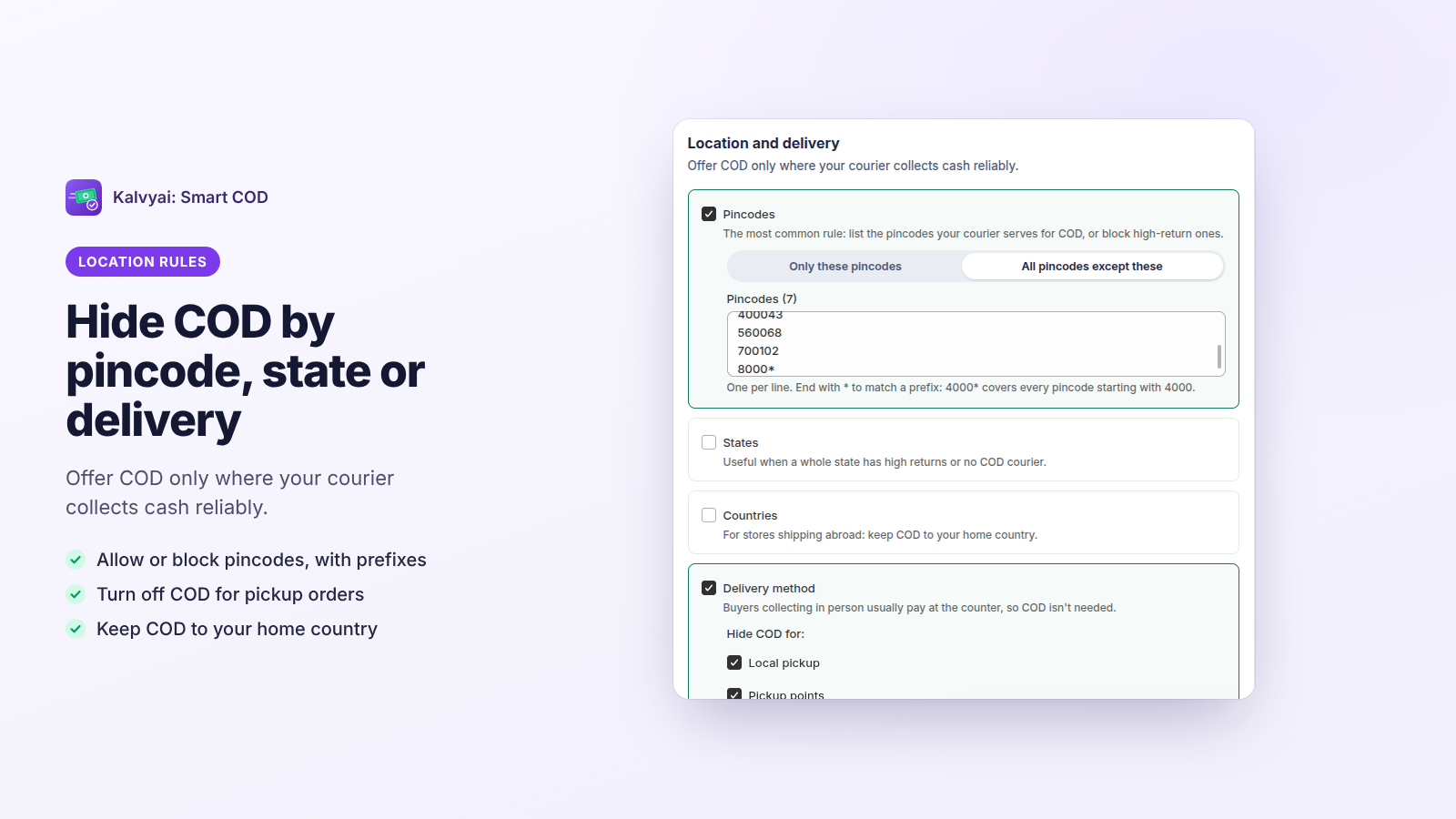
- Under Location and delivery, turn on Pincodes.
- Choose "Only these pincodes" to allow COD just where your courier collects cash, or "All pincodes except these" to block high-return pincodes.
- Add one pincode per line. End a line with * to match a prefix, for example 4000* covers every pincode that starts with 4000.
- Use the Test an order panel to enter a pincode, state and cart value and see whether COD would be shown.
- Save. The rule applies at checkout.
Other rules worth turning on
- Cart value: offer COD only between a minimum and maximum, so tiny orders and very large unpaid ones are skipped.
- Number of items: limit bulk COD orders, which are often fake or refused.
- States and countries: turn off COD for a whole state with high returns, or keep COD to your home country.
- Delivery method: hide COD for local pickup and pickup points, where buyers usually pay at the counter.
- Customer tags: block buyers tagged cod-rto. Smart COD can add this tag automatically when a buyer refuses a parcel.
Which pincodes should you block?
Start with two lists: your courier's pincodes where COD isn't serviceable, and the pincodes in your own RTO report with the most refused parcels. Smart COD tracks RTO by pincode, so you can review the list every few weeks and update it.
Get started
Pincode, cart, product and customer rules are included in Smart COD's free plan. Install Kalvyai: Smart COD Fee & Rules from the Shopify App Store: https://apps.shopify.com/smart-cod-fees-rules-rto
Kalvyai Engineering · Engineering team
The engineers who build, connect and fix business systems at Kalvyai: Odoo, ERPNext, Shopify and AI agents that work inside them with approvals, budgets and an audit trail.

Comments
No comments yet. Questions and corrections are welcome.
Rate this post or leave a comment